CHURCH MANAGEMENT FOR THE WORK BETWEEN SUNDAYS

See who needs care.
Know what needs doing.
Keep ministry moving.

Cemstree gives your staff one place to welcome new people, coordinate Sundays, follow through on care, and carry the story forward without rebuilding context in spreadsheets, inboxes, and group texts.

Built for church teams who want fewer dropped handoffs and do not want another screen to babysit.
ONE SHARED PLACE FORPeople & householdsCare & next stepsSunday planningStaff collaborationCommunication
START THE DAY WITH CLARITY

The work is visible.
The person is never reduced to a task.

The Command Deck brings ministry priorities and the context behind them into one honest view.

Actual Cemstree interfaceCommand Deck · internal workspace
Actual Cemstree Command Deck showing ministry totals, a pastoral action queue, next actions, and onboarding milestones.
Real product, not a marketing recreation. Names and totals shown are internal setup data, not customer results.
WHY CEMSTREE

Church software should answer the questions ministry creates.

WELCOME

Did someone notice the new guest?

Keep a person’s visit, household, communication, and next contact in one connected record.

See People & Care →
CARE

Who owns the next conversation?

Turn a need into a clear, protected next action instead of another message in a crowded inbox.

See the care workflow →
SUNDAY

What could surprise us this weekend?

Bring plans, volunteers, rooms, check in, and team coordination into view before Sunday.

See Sunday operations →
FOLLOW THROUGH

Did we do what we said we would do?

Keep forms, communications, assigned work, and ministry history close enough to act on.

See Engagement →
SEE HOW THE WORK CONNECTS

One church story.
One place to carry it forward.

The value is not simply having more information. It is giving the right person enough context to act with care.
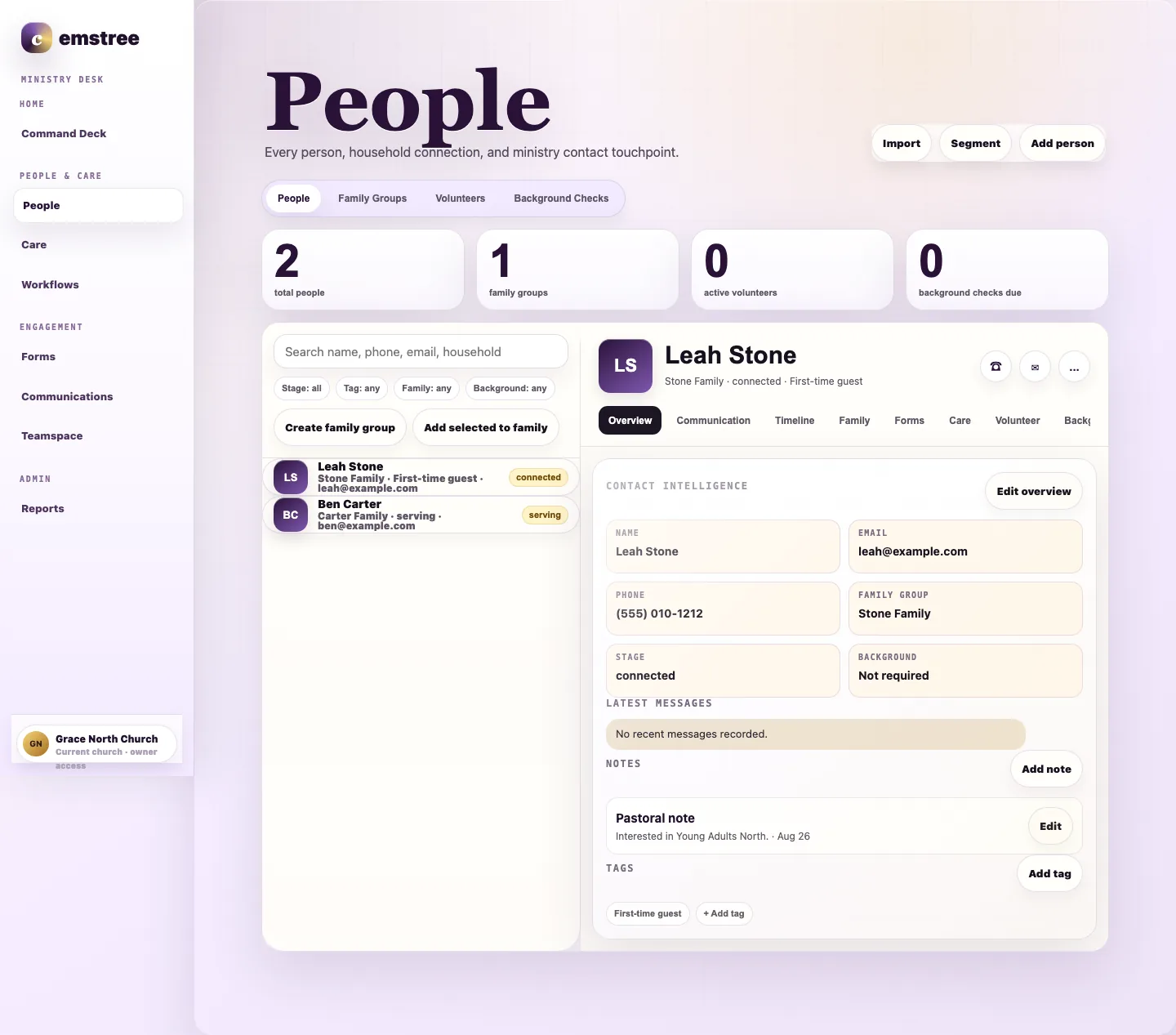
Actual Cemstree People interface showing a person record, household details, pastoral context, and tags.
Actual People interface. Names and details are internal setup data.
WELCOME SOMEONE WELL

The first conversation should not start from scratch.

When someone visits, asks for care, joins a group, or begins serving, their story stays connected. Staff can see what matters before reaching out.

  • Keep household relationships together.
  • See previous conversations and ministry activity.
  • Give the next response a clear owner.
Explore People & Care →
WORKFLOWS & AUTOMATIONS

Let the routine work move while your team stays personal.

Cemstree watches for meaningful ministry moments, applies your rules, and moves the right next action to the right person at the right time.
  • Start a path from visits, care, forms, groups, attendance, or serving.
  • Use conditions, timing, assignments, messages, and staff tasks.
  • Keep every automated action visible on the person timeline.
Explore Workflows & Automations →
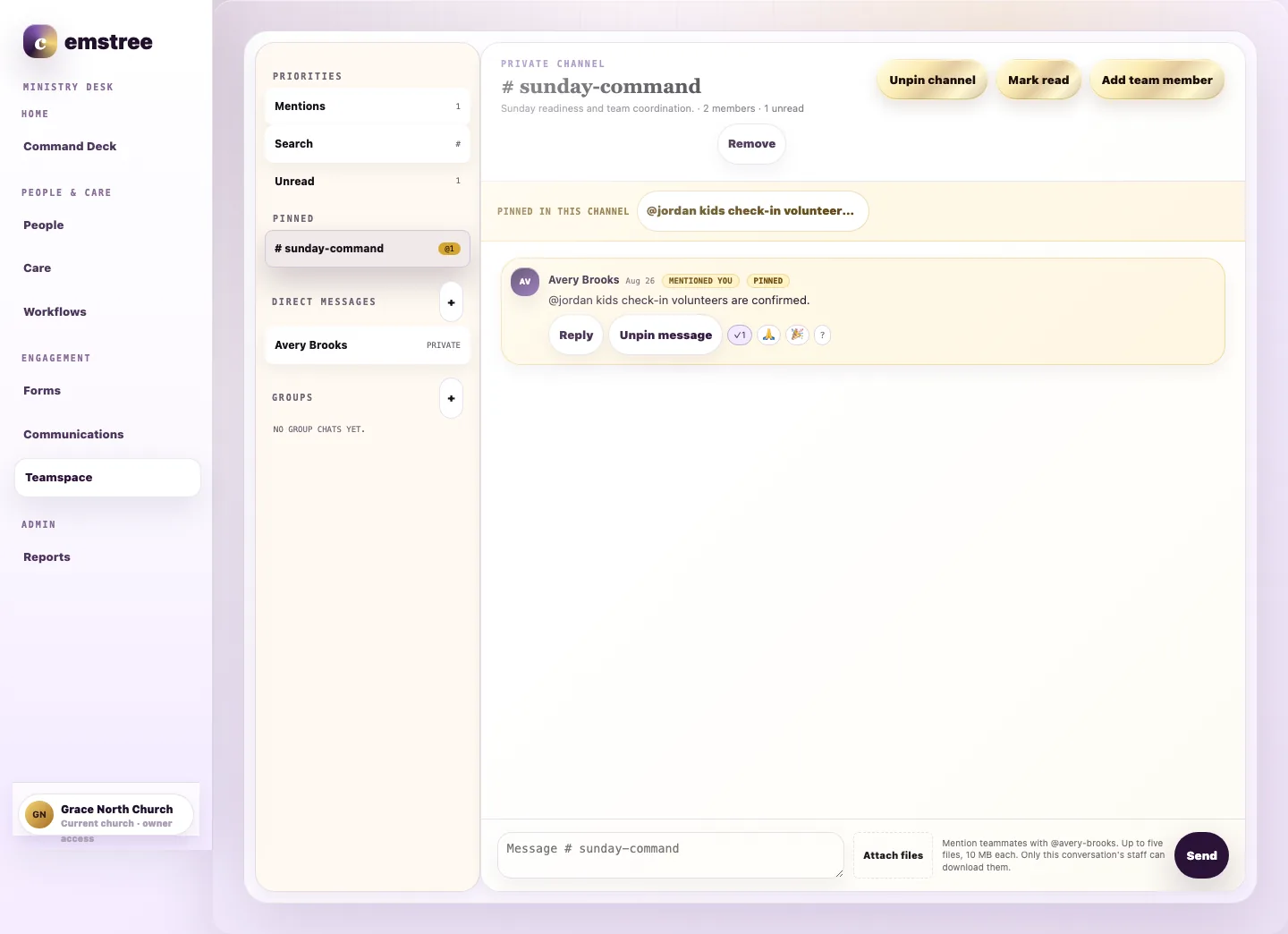
Actual Cemstree Teamspace interface showing staff coordination for Sunday.
Actual Teamspace interface. Internal setup conversation shown.
PREPARE FOR SUNDAY TOGETHER

Keep the conversation beside the work.

Service plans, volunteer needs, rooms, registrations, and check in create questions all week. Teamspace gives staff a protected place to solve them together.

  • Make open needs easier to see.
  • Keep decisions available to the whole team.
  • Carry Sunday responses into the coming week.
Explore Sunday Operations →
FROM FIRST HELLO TO TRUSTED LEADER

Keep the next step visible without turning people into a pipeline.

Cemstree preserves the human story while giving staff enough structure to welcome, care, connect, equip, and follow through.

  1. WelcomeNotice the person and respond personally.
  2. CareHold needs with context and appropriate privacy.
  3. ConnectMake groups and relationships easier to navigate.
  4. ServeCoordinate people around meaningful ministry.
  5. LeadEquip trusted people to care for others.
BUILT FOR THE WHOLE WEEK

Ministry does not begin when the service starts.

Cemstree helps the team carry one shared picture from Monday planning through Sunday service and into the response that follows.

MONReview what needs attention

See new people, open care, unfinished responses, and current priorities.

TUEPlan the work

Prepare services, events, rooms, resources, forms, and volunteer needs.

WEDCoordinate the team

Resolve questions, assign owners, and keep decisions easy to find.

SUNServe with confidence

Welcome households, support volunteers, manage arrivals, and respond to change.

NEXTFollow through personally

Carry care, guest response, attendance, and promised actions into the new week.

ONE CHURCH, DIFFERENT RESPONSIBILITIES

Give every leader the view their work requires.

People should not have to search the entire system to understand their day. Cemstree brings each role closer to the people and decisions they are responsible for.

PASTOR

Care with context

See needs that require attention while keeping sensitive details inside the right boundaries.

EXECUTIVE LEADER

Clarity across the church

See where work is moving, where ownership is missing, and where the team needs support.

ADMINISTRATOR

One dependable record

Keep people, households, forms, events, rooms, registrations, and data quality connected.

MINISTRY LEADER

The next action in reach

Coordinate groups, volunteers, conversations, and responses without rebuilding the story.

TRUST IS PART OF THE PRODUCT

Church data deserves more than a password.

Care details, family relationships, children, giving records, staff conversations, and member identity should only be available to the people whose role requires them.
Access based on roleStaff, pastors, leaders, members, and check in workers receive different access.
Church specific boundariesOrganization scope and database policies protect one church from another.
Traceable activityImportant changes remain connected to audit and activity history.
See Security & Trust →
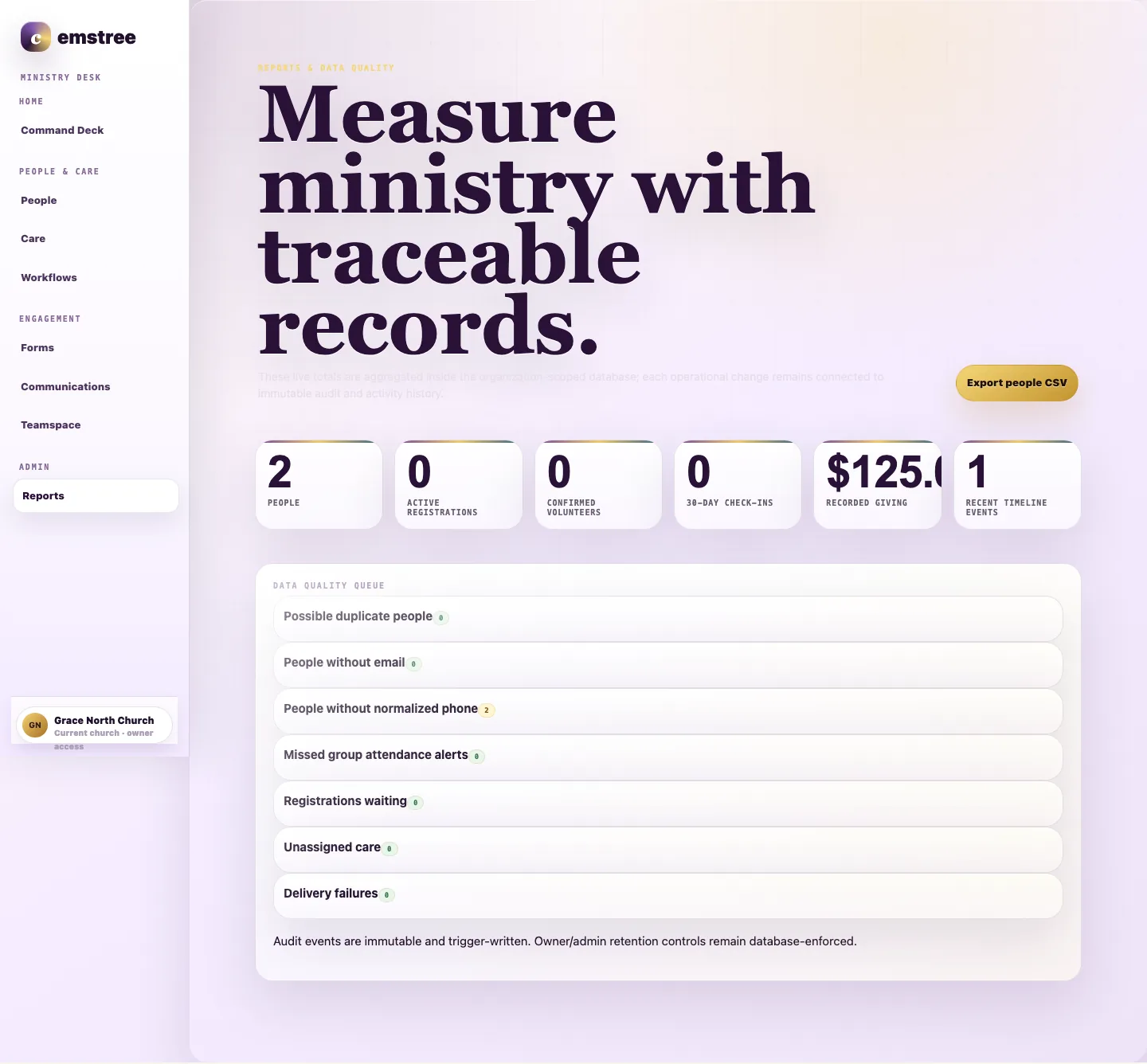
Actual Cemstree Reports interface showing ministry totals and data quality checks.
Actual Reports interface. Totals are internal setup data, not customer results.
USEFUL RIGHT NOW

Put numbers around the friction your team already feels.

Use your own inputs to estimate system cost, plan response workload, and check Sunday readiness. No signup and no pretend ROI.

Open the free church tools
COMMON QUESTIONS

Before you change a system this important, you should ask hard questions.

Does Cemstree replace every tool our church uses?

Cemstree brings people, care, Sunday operations, workflows, communication, collaboration, and reporting into one church system. Payment and message delivery connect through approved providers while consent, activity, and ministry context remain together.

Can we bring our existing people and household data?

Yes. Guided migration covers export review, cleanup, field mapping, household relationships, validation, and cutover so your team begins with a dependable record.

How does Cemstree handle private care information?

Pastoral notes are separated from broad staff visibility. Organization scope, role based permissions, and database policies form the access boundary.

What can our church automate?

Workflows can begin with a visit, care need, form, group change, attendance event, registration, or serving milestone. Add conditions, timing, staff assignments, messages, tasks, and personalized paths while every action remains traceable.

PRICING IS LIVE

Bring a calmer rhythm to the work between Sundays.

Compare the plans now available for churches that want Cemstree as their operating system.